


When a company starts its journey on AWS without the support of a consultancy or with an inexperienced team, everything usually begins in a single account. The first services are deployed quickly, teams have administrative access, and the main concern is getting workloads into production.
It was no different for us.
When we identified the opportunity to start our cloud journey, even with some external support, we didn’t see the need for a multi-account environment.
However, as the environment grew, we began to face new challenges:
- How do we separate production and staging environments?
- How do we track costs per business unit?
- How do we prevent users from creating resources outside corporate standards?
- How do we enforce governance without limiting team productivity?
It was the need to address these questions that led me to dive deeper into AWS Organizations — and it turned out to be a foundational piece of the puzzle. In this article, we’ll look at how to structure multiple AWS accounts from the ground up, real-world examples of Service Control Policies (SCPs), and the main governance practices used in enterprise environments.
What is AWS Organizations?
AWS Organizations is a service that allows you to centrally manage multiple AWS accounts. Instead of administering each account individually, you can group them into a single organization and apply governance policies at scale.
In practice, this enables:
- Centralized billing
- Access delegation across teams
- Security controls
- Enforcement of corporate policies
- Environment isolation
The main advantage is that each account remains an independent security boundary, reducing the impact of operational mistakes and misconfigurations.
The most common mistake: separating everything by VPC only
Many companies start their architecture by creating separate VPCs for different environments:
- Production
- Staging
- Development
While this works initially, the approach has limitations because all resources continue to share:
- Service quotas
- Billing
- IAM
- Global configurations
Furthermore, an administrative mistake can affect all environments simultaneously. That’s why AWS recommends using multiple accounts as the primary unit of isolation.
Structuring an AWS Organization from scratch
A simple and efficient structure for small and medium-sized businesses can follow the model below:
Root
│
├── Security OU
│   ├── Log Archive
│   └── Security Tooling
│
├── Network OU
│   └── Networking Hub
│
├── Shared Services OU
│   ├── Sandbox
│   └── Shared Services
│
├── Workloads OU
│   ├── DEV
│   ├── HML
│   └── PRD
│
└── Management Account
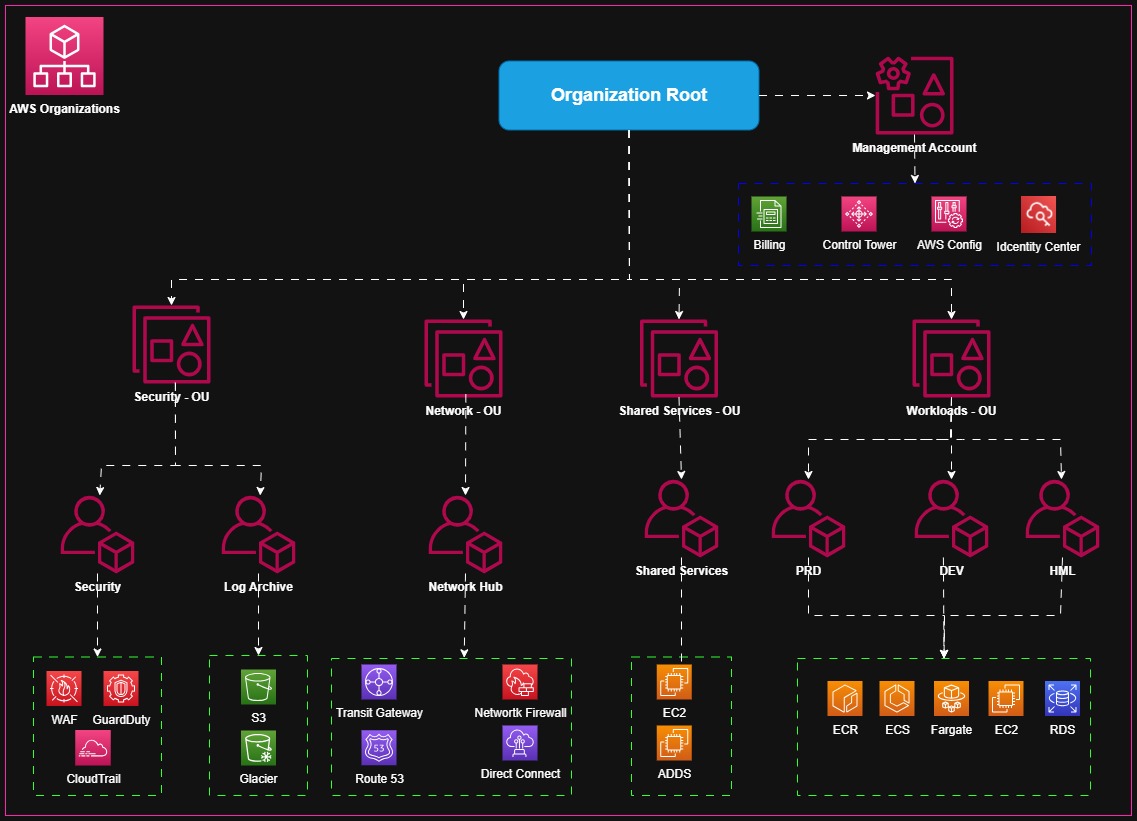
Security OU
Contains accounts responsible for:
AWS Security Hub
AWS GuardDuty
AWS Config
AWS IAM Identity Center
Log centralization
Network OU
Responsible for shared networking services:
Transit Gateway
Direct Connect
Corporate DNS
Backup tools
Monitoring tools
Workloads OU
Hosts the workloads (PRD, DEV, etc.).
Shared Services OU
Contains Sandbox environments and shared services. Typically has more flexible policies to allow experimentation.
Management Account
Each critical application can have its own account, making it easier to manage:
- Governance
- Costs
- Security
- Auditing
Cost control with multiple accounts
One of the biggest benefits of AWS Organizations is financial visibility. Without multiple accounts, identifying who is consuming resources becomes complex. With a well-organized structure, however, you can quickly answer questions such as:
- How much did the production environment spend this month?
- Which application is generating the most cost?
- Which team increased its storage consumption?
In addition, Consolidated Billing allows you to consolidate all organization charges into a single invoice, significantly simplifying financial management.
Understanding the role of SCPs
A common misconception is thinking that an SCP grants permissions. In fact, it does the opposite. A Service Control Policy defines the maximum boundary of what can be executed within an account. Even if a user has administrative permissions, an SCP can still block certain actions. Think of an SCP as a corporate guardrail layer.
Example 1: Block CloudTrail deletion
A common practice is to prevent users from disabling audit mechanisms.
{
  "Version": "2012-10-17",
  "Statement": [
    {
      "Effect": "Deny",
      "Action": [
        "cloudtrail:DeleteTrail",
        "cloudtrail:StopLogging"
      ],
      "Resource": "*"
    }
  ]
}
This control significantly reduces the risk of losing traceability during incidents.
Example 2: Restrict to approved regions
Many organizations operate only in specific regions. An SCP can block deployments outside those locations.
{
  "Version": "2012-10-17",
  "Statement": [
    {
      "Sid": "DenyOutsideApprovedRegions",
      "Effect": "Deny",
      "NotAction": [
        "iam:*",
        "route53:*"
      ],
      "Resource": "*",
      "Condition": {
        "StringNotEquals": {
          "aws:RequestedRegion": [
            "sa-east-1",
            "us-east-1"
          ]
        }
      }
    }
  ]
}
This policy helps prevent resources from being accidentally created in unapproved regions.
Example 3: Prevent backup deletion
One of the most valuable SCPs in enterprise environments.
{
  "Version": "2012-10-17",
  "Statement": [
    {
      "Effect": "Deny",
      "Action": [
        "backup:DeleteBackupVault",
        "backup:DeleteRecoveryPoint"
      ],
      "Resource": "*"
    }
  ]
}
This type of protection is extremely useful in ransomware scenarios and disaster recovery.
Example 4: Block Sandbox accounts from creating expensive resources
Many companies create Sandbox accounts for experimentation. Without controls, users can provision very large instances or high-cost services. An SCP can limit the creation of certain resource types and reduce financial waste.
{
  "Version": "2012-10-17",
  "Statement": [
    {
      "Sid": "DenyExpensiveEC2Instances",
      "Effect": "Deny",
      "Action": "ec2:RunInstances",
      "Resource": "arn:aws:ec2:*:*:instance/*",
      "Condition": {
        "StringNotEquals": {
          "ec2:InstanceType": [
            "t3.micro",
            "t3.small",
            "t3.medium",
            "t2.micro",
            "t2.small"
          ]
        }
      }
    },
    {
      "Sid": "DenyExpensiveRDSInstances",
      "Resource": "arn:aws:rds:*:*:db:*",
      "Effect": "Deny",
      "Action": "rds:CreateDBInstance",
      "Condition": {
        "StringNotEquals": {
          "rds:DatabaseClass": [
            "db.t3.micro",
            "db.t3.small",
            "db.t3.medium"
          ]
        }
      }
    },
    {
      "Sid": "DenyExpensiveServices",
      "Effect": "Deny",
      "Action": [
        "redshift:CreateCluster",
        "elasticmapreduce:RunJobFlow",
        "sagemaker:CreateTrainingJob",
        "sagemaker:CreateEndpoint"
      ],
      "Resource": "*"
    }
  ]
}
Governance beyond SCPs
Although SCPs are important, they represent only one part of a governance strategy.
A mature architecture typically includes:
| Service | Function |
|---|---|
| AWS Config | Monitors resource compliance |
| AWS Security Hub | Centralizes security alerts |
| AWS GuardDuty | Detects suspicious activity |
| IAM Identity Center | Manages identity |
| AWS Backup | Centralizes backups |
Best practices for enterprise environments
After working with multi-account environments, a few recommendations stand out:
- Do not use the Management account to host workloads.
- Keep a dedicated account for logs and auditing.
- Use OUs to reflect business policies, not just departments.
- Apply SCPs in a controlled manner initially to avoid unexpected impact.
- Centralize identity management through IAM Identity Center.
- Implement a mandatory tagging strategy from the very beginning.
- Automate account creation using AWS Control Tower whenever possible.
- Regularly review unused accounts and Sandbox environments.
Conclusion
AWS Organizations is much more than a tool for grouping accounts. It represents the foundation for a scalable strategy for security, governance, and financial management within AWS.
Companies that properly structure their organization from the start avoid common problems related to access, auditing, costs, and compliance.
The combination of multiple accounts, well-defined Organizational Units, and carefully planned SCPs creates a solid foundation for the long-term growth of the platform.
The sooner this structure is implemented, the less effort it will take to keep the environment organized and secure as new applications and teams are onboarded.